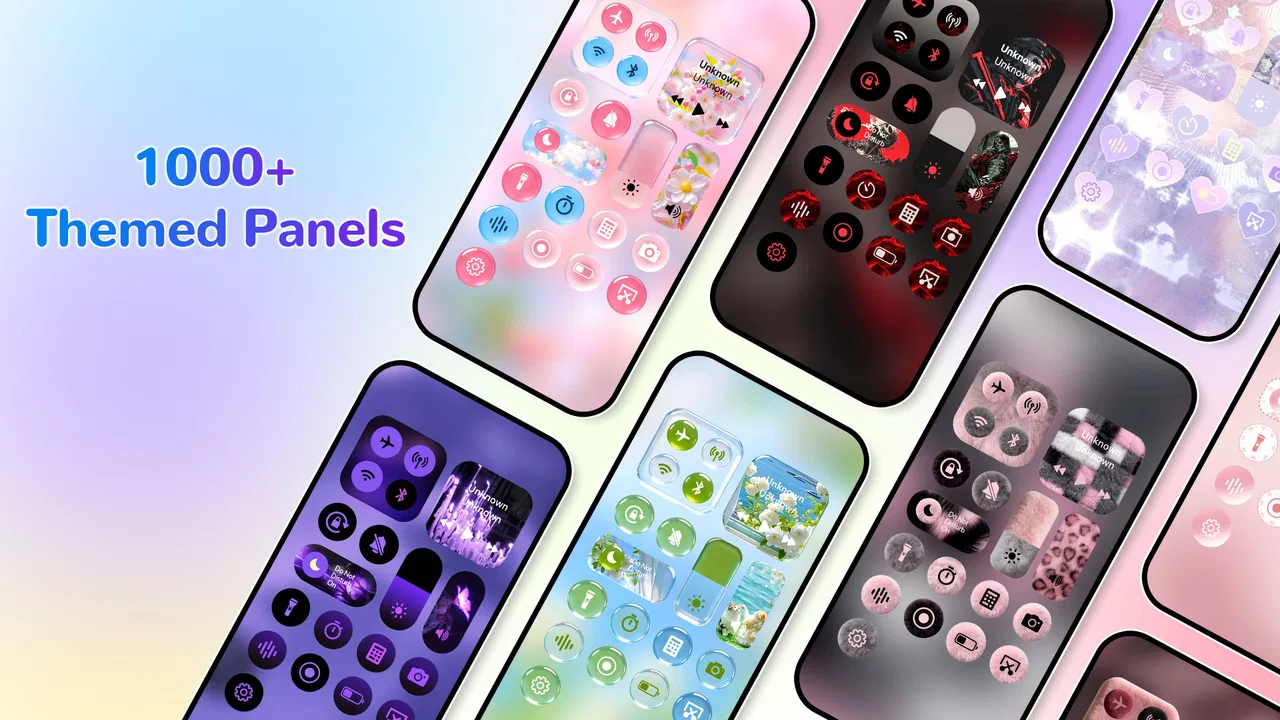
Control Widget - Themed Panels
- 4.5
- Rating
- 10.00M
- Installs
- Free
- Price

 Analysis by App-foxy
I spent time with Control Widget - Themed Panels as a personalization app, and my first impression was that it aims to make everyday phone controls feel more deliberate. Instead of treating the quick settings area as something I simply tolerate, it gives me a way to shape the panel around the shortcuts I actually reach for. That sounds small, but it changes the rhythm of using a phone: fewer searches through settings, less visual clutter, and a control surface that feels more like mine.
The app comes from iControl Tools and is free to install, with optional in-app purchases ranging from $2.99 to $29.99 per item. It is rated for Everyone, works on devices running Android 6.0 or later, and its current release is version 1.7. Those details make it accessible to a broad range of Android users, although the experience can still vary depending on the phone manufacturer and how that device handles system panels and widgets.
What interested me most was not the promise of a prettier control panel by itself. The practical question is whether customization remains useful when I am moving between Wi-Fi networks, using mobile data, dealing with a weak connection, or trying to change a setting quickly. A themed panel is only worthwhile if it stays convenient when the phone is busy, the signal is poor, or I am in a hurry.
You May Also Like

 Pandora - Music & Podcasts
Pandora’s Music Is Easy to Start, but Harder to Recover
Pandora’s strength is its low-effort path from a seed to a station. Its weak spot is how much confidence it asks you to place in connection, setup, and quiet recovery.

 8 Ball Pool
 Is Built on Rivalries, Rematches, and Routine
A close look at the rivalries, rematches, shared routines, and unanswered safety questions that turn a quick pool match into a persistent mobile community.

 Samsung Music
’s Quiet Strength Is Playing What You Already Own
Its reach comes less from spectacle than from dependable access to a personal library. That simplicity is both the app’s strongest retention engine and its ceiling.

 AccuWeather: Weather Radar
AccuWeather Review: A Quick, Clear Forecast for Everyday Decisions
For everyday plans, the best forecast is the one you can understand quickly. AccuWeather makes rain timing, radar, and local conditions easy to act on, with a few trade-offs.

 Hill Climb Racing
Why Hill Climb Racing Still Turns Crashes Into One More Run
A tiny car, a bumpy hill and one more upgrade: Hill Climb Racing keeps resurfacing because its simple chaos makes every near-miss feel personal.

 AliExpress - Shopping App
AliExpress Makes Global Shopping Feel Personal, but Shoppers Bear the Risk
AliExpress turns a global marketplace into a pocket-sized discovery engine. Its reach is useful, its shopping loop compelling, and its trade-offs easy to miss.
More From Our News Desk
View All News


How the personalized panel fits into daily phone use
I find a personalized panel most useful when it becomes part of a routine rather than another screen to tinker with. I’d first decide which controls I reach for during a typical day, then arrange and style the panel with quick recognition in mind. That small bit of planning helps me judge whether the customization actually reduces friction, and it sets up the next question: how well does that routine hold up as the day changes?
A quick surface for repeated actions
The strongest use case is repetition. I often perform the same small actions throughout a day: checking connectivity, adjusting brightness, changing sound behavior, or reaching a frequently used control. Android already offers quick settings, but the default arrangement is not always the one I would choose. A customizable panel lets me think in terms of routine rather than the order imposed by the device.
I found it helpful to treat the panel as a compact workspace instead of decorating every available area. The best result came from keeping the controls I use under pressure near the easiest reach point and leaving less important options out of the main view. This is a simple adjustment, but it prevents personalization from becoming another layer of visual noise.
Themed styling also has a practical side. A panel that is visually distinct from the rest of the interface can be easier to recognize at a glance. That matters when I am unlocking the phone while walking, switching from headphones to the speaker, or checking whether a connection-related setting is active before opening another app. The design is not automatically better just because it is more colorful; the useful part is being able to create a panel that supports recognition.
Connectivity is where the idea becomes practical
Network-related actions expose both the value and the limits of this kind of tool. When I am leaving home, entering a workplace, or moving into a crowded public area, I want to make a connection change without navigating through several system screens. A personalized quick panel can shorten that process and make the relevant control easier to find.
There is an important distinction, though. The app can help organize access to controls, but it does not turn an unstable network into a stable one. If Wi-Fi is slow, mobile coverage is weak, or a captive portal needs a browser sign-in, a better-looking panel will not solve the underlying problem. I see it as a faster doorway to settings, not as a connectivity repair tool.
That distinction is especially important for people who expect a widget or themed panel to monitor their connection continuously. My recommendation is to judge it by how quickly it helps you reach a control, not by whether it can diagnose every reason an online service is failing. The app’s value is strongest at the interaction layer: finding and using a control with less friction.
Mobile situations where small improvements matter
On a large phone, reaching the top edge can be awkward, particularly when I am carrying something in the other hand. A customized control surface is most useful when it reduces that physical effort or puts familiar actions in a predictable place. I would spend a few minutes arranging the panel around one-handed use rather than choosing a layout only because it looks balanced.
Travel is another realistic scenario. At an airport or station, I may move between known Wi-Fi, public Wi-Fi, and mobile data while also watching battery use. The useful workflow is not to keep changing every option constantly, but to make the few relevant controls easy to identify. I can check the connection state, make a deliberate switch, and return to the task without digging through the full settings application.
In a meeting, the same principle applies to sound and interruptions. A compact panel can make a quick change less conspicuous than opening several menus. At home, it can make routine adjustments feel faster. These are modest gains, but they add up for anyone who interacts with system controls many times a day.
Theme choices need restraint
The visual side deserves a realistic warning. Personalization apps often encourage experimentation, and it is easy to select a theme that looks impressive in a preview but becomes tiring after repeated use. I prefer strong contrast, clear separation between active and inactive controls, and enough empty space to identify an option instantly.
A busy design can be a disadvantage when I am trying to act quickly. It may also make the panel harder to read in bright outdoor light or at a glance while moving. My practical tip is to test a theme during an ordinary day rather than judging it during setup. If I have to pause to interpret the design, the customization is working against the purpose of quick settings.
What happens when the connection is unreliable?
The most useful way to think about network dependence is to separate setup from everyday control. Any personalization experience may involve an initial configuration step, and themed content or changes may require the app or device to complete an online action. I would therefore prepare the panel before leaving a reliable connection, especially if I know I will need it during travel or in an area with poor coverage.
Once I am using the phone in a weak-signal area, I would not assume that every visual change or customization action will behave identically to a connected session. The safe workflow is to avoid making last-minute design changes when I am already offline or dealing with an unreliable network. Configure first, then rely on the finished arrangement for the situation at hand.
This is not a criticism unique to this app; it is a sensible boundary for any tool whose experience may involve online resources or system-level coordination. The important point is that the panel should be treated as a prepared utility rather than something I continuously rebuild while connectivity is changing.
Recovery after a failed or confusing change
Personalization can create its own troubleshooting problem: after changing a layout or theme, I may not immediately know whether an issue comes from the app, Android, or the phone manufacturer’s interface. I found that the best recovery habit is to change one element at a time. If I alter the theme, arrangement, and control selection together, it becomes much harder to identify which choice caused confusion.
I would also keep a simple mental record of the arrangement that works. If a new style reduces readability, returning to a familiar layout is more useful than repeatedly adding more visual adjustments. This is one reason I prefer functional customization over constant experimentation. The panel should save time, not become a project that needs regular maintenance.
Users should also remember that Android skins do not all expose controls in exactly the same way. A layout that feels natural on one manufacturer’s phone may not translate perfectly to another. Before paying for any optional item, I would first confirm that the free experience fits my device and that the controls I care about are presented in a way I can use comfortably.
Being careful with data while personalizing
Because this app sits close to connectivity controls, I would use it with a data-conscious mindset. I would avoid making repeated theme changes over mobile data simply for experimentation, and I would prepare visual choices while connected to a trusted network. That keeps the setup process intentional and avoids turning cosmetic testing into unnecessary mobile activity.
I also recommend separating two questions: “Can I reach this control quickly?” and “Should I leave this connection active?” The app may make a setting easier to reach, but the decision about Wi-Fi, mobile data, or another connection still belongs to me. Convenience can encourage automatic tapping, so I would check the resulting state rather than assuming that a one-tap action produced the outcome I intended.
For people with limited data allowances, the sensible approach is to keep the panel stable once it works. Personalization is most valuable when it supports a repeatable routine. Constantly downloading or trying new visual variations would add little practical benefit compared with choosing one readable arrangement and keeping it.
Who will get the most from it?
I think the app is a good fit for Android users who are dissatisfied with the standard quick settings presentation and want more control over the way repeated actions are organized. It is particularly appealing if you care about visual consistency, use connectivity controls frequently, or want a panel that feels less generic than the one supplied by the phone.
It is also suitable for someone who likes to refine a phone gradually. You do not need to redesign everything at once. Start with the controls used every day, choose a readable theme, and evaluate whether reaching those actions has become easier. That measured approach gives the app a fair test and avoids confusing decoration with improvement.
I would be more cautious about recommending it to someone who already finds the default Android panel perfectly convenient. If you rarely open quick settings, the benefit may be too small to justify learning another customization layer. It is also not the right choice for someone looking for a dedicated network diagnostic tool, a solution to poor coverage, or a guarantee that every manufacturer’s interface will behave identically.
How it compares with the usual alternatives
The obvious alternative is the built-in Android quick settings panel. That option has the advantage of familiarity and direct integration with the phone. There is nothing extra to learn, and it is the safer choice for users who prioritize simplicity over appearance. The trade-off is that the default panel may feel limited or visually disconnected from the rest of a carefully customized phone.
Another alternative is changing the phone’s broader theme or launcher. That can produce a more complete visual transformation, but it may not improve the specific moment when I need a quick control. A launcher changes the home experience; this app focuses attention on the control surface. If my frustration is specifically about quick settings, a targeted tool makes more sense than replacing the entire home screen.
Manual navigation through the main Settings app remains the most dependable fallback when I need detailed network information or a setting that does not belong in a quick panel. It is slower, but it gives me more context and reduces the chance of changing something accidentally. I would use the personalized panel for frequent, simple actions and the full settings screens for diagnosis or less familiar changes.
Value, accessibility, and the paid layer
The free entry point makes it easy to decide whether the concept suits me before spending anything. That matters because the value depends heavily on personal habits. Someone who changes connectivity and other quick controls often may notice the benefit quickly, while a casual user may see the customization as pleasant but nonessential.
The optional purchases, priced from $2.99 to $29.99 per item, create a wide range between a small upgrade and a much more substantial purchase. I would approach those items as optional enhancements rather than assuming they are necessary for basic usefulness. First establish whether the free version improves your daily routine; only then consider paying for a specific addition that solves a clear problem.
The Everyone age rating also makes the app approachable for a broad audience, but accessibility is not only about age. Readability, contrast, touch target comfort, and the amount of visual information matter more in daily use. A theme that looks attractive in a screenshot may not be the best choice for someone who needs fast recognition or uses the phone outdoors.
My connectivity verdict
After using it as a practical personalization tool, I see Control Widget - Themed Panels as a focused way to make quick controls easier to recognize and more aligned with personal routines. Its relationship with connectivity is indirect but meaningful: it can make network-related actions quicker to reach, while leaving the actual quality of the connection to the network, the phone, and the surrounding conditions.
The app has earned a 4.3 average from around 655 thousand ratings and has passed 10 million installs, which suggests that the idea has reached a substantial Android audience. Those figures do not replace personal testing, but they make it clear that this is more than a niche experiment. The developer, iControl Tools, has positioned it in the personalization space rather than as a network utility, and that is the standard I would use to judge it.
My final advice is to install it if your frustration is about the look, placement, or reachability of quick settings. Build a restrained panel, test it during real mobile situations, and prepare it before entering areas with unreliable service. If your main problem is dropped connections, detailed diagnostics, or deep system control, stay with Android’s native settings or choose a tool designed specifically for that job. For the right user, the best result is not a dramatic redesign but a faster, calmer way to reach the controls used every day.
FAQs for Control Widget - Themed Panels
01What is Control Widget - Themed Panels and how does it work?
Control Widget - Themed Panels is a customizable widget app designed for Android and iOS devices that allows users to personalize their home screens with themed control panels. It provides quick access to settings and apps, enhancing both functionality and aesthetic appeal. Users can select from various themes or create their own to match their device's style.
02How can I customize the themes in Control Widget - Themed Panels?
Customization in Control Widget - Themed Panels is straightforward. Users can choose from a variety of pre-designed themes or create a personalized theme by selecting colors, icons, and layout preferences. The app provides an intuitive interface, allowing users to drag and drop elements to design their perfect control panel.
03Is Control Widget - Themed Panels compatible with all devices?
Control Widget - Themed Panels is compatible with most Android and iOS devices. However, it is recommended to check the app's requirements on the download page to ensure it supports your device's operating system version. Regular updates are released to expand compatibility and introduce new features.
04Does Control Widget - Themed Panels affect device performance or battery life?
Control Widget - Themed Panels is optimized for minimal impact on device performance and battery life. The app uses efficient coding and lightweight themes to ensure smooth operation. However, extensive use of high-resolution graphics and animations may slightly affect performance on older devices.
05Is there a cost associated with using Control Widget - Themed Panels?
Control Widget - Themed Panels offers a free version with basic features and themes. For access to premium themes, additional customization options, and ad-free usage, users can opt for a subscription or one-time purchase. Pricing details are available in the app store listing, and occasional discounts may be offered.
Pros
- Highly customizable themes and layouts.
- Seamless integration with most systems.
- User-friendly interface design.
- Efficient performance with low resource usage.
- Frequent updates with new features.
Cons
- Limited free features in basic version.
- Some themes require in-app purchases.
- Occasional lag on older devices.
- Limited third-party app support.
- Initial setup can be time-consuming.

Control Widget - Themed Panels
Gallery